
Superstars Sports Package
🟢 Superstars Sports Package
“Stream Like a Champion.”
1. Step into the Arena
When you go live, you're not just hitting “Start Streaming” — you’re stepping into the spotlight.
The Superstars Sports Package gives your stream the same energy, polish, and style as a real-world sports broadcast. Whether you're playing FIFA 24, NBA 2K, Madden NFL, eFootball, or even UFC, this package transforms your channel into a premium athletic experience.
Think ESPN meets Twitch — fast, flashy, and fueled by competition.
2. Designed for Competitive Streamers
Every detail in this overlay was built with athletes, gamers, and fans in mind. From the dynamic green-and-black aesthetic to scoreboard-inspired labels, this package lets your viewers feel like they’re watching a live match — not just another stream.
It’s not just overlays — it’s a brand identity for creators who take the game seriously.
3. What’s Included – All Assets
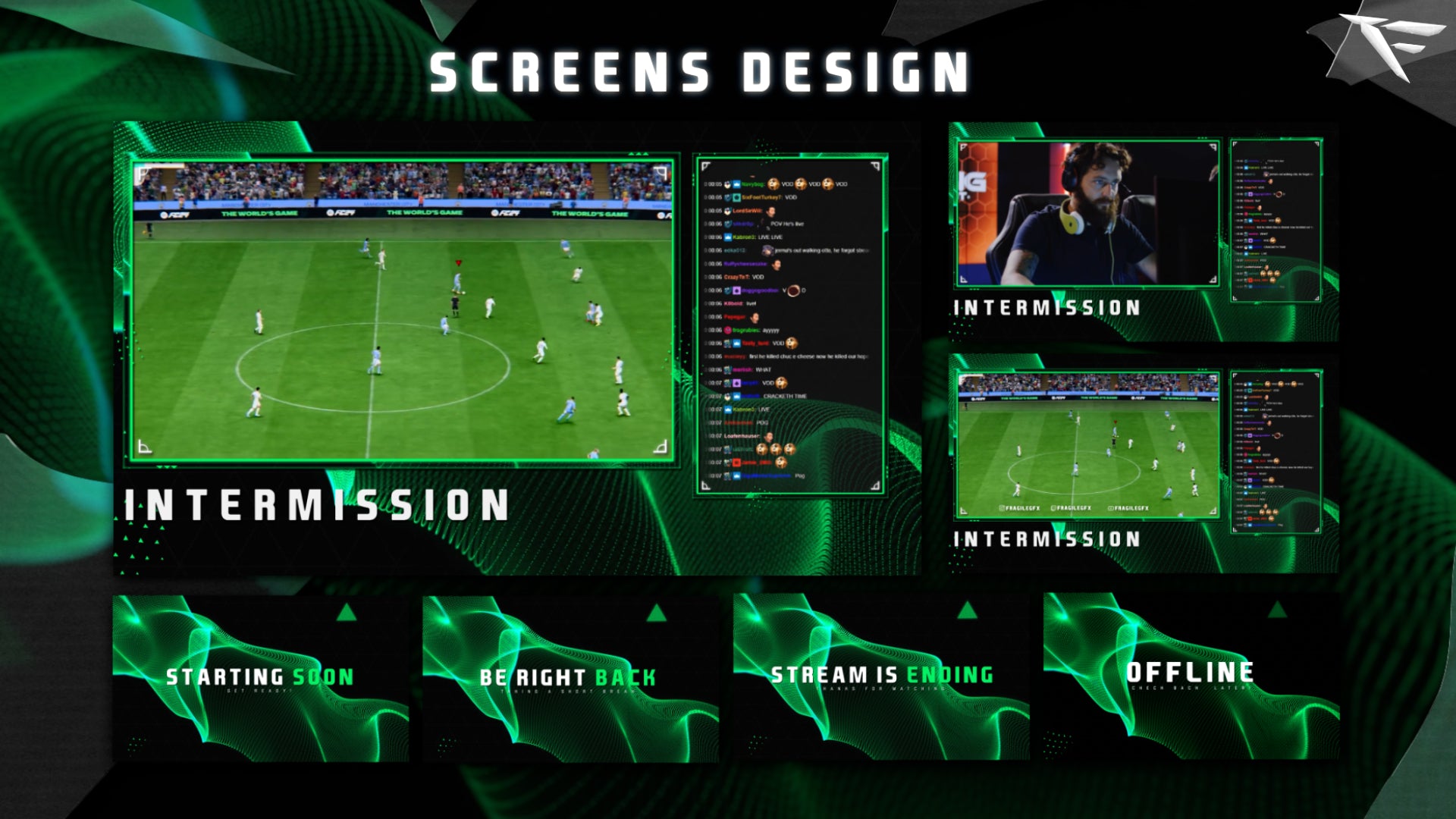
🎥 Animated Stream Scenes:
-
Starting Soon
Countdown overlay with vibrant energy bars and motion blur accents -
Be Right Back (BRB)
Minimal break screen with a sports ticker and pulsing background -
Ending Screen
Final match-style scene with a soft zoom-out effect -
Offline Screen
Static but powerful — perfect branding for when you're away
📸 Facecam Overlay:
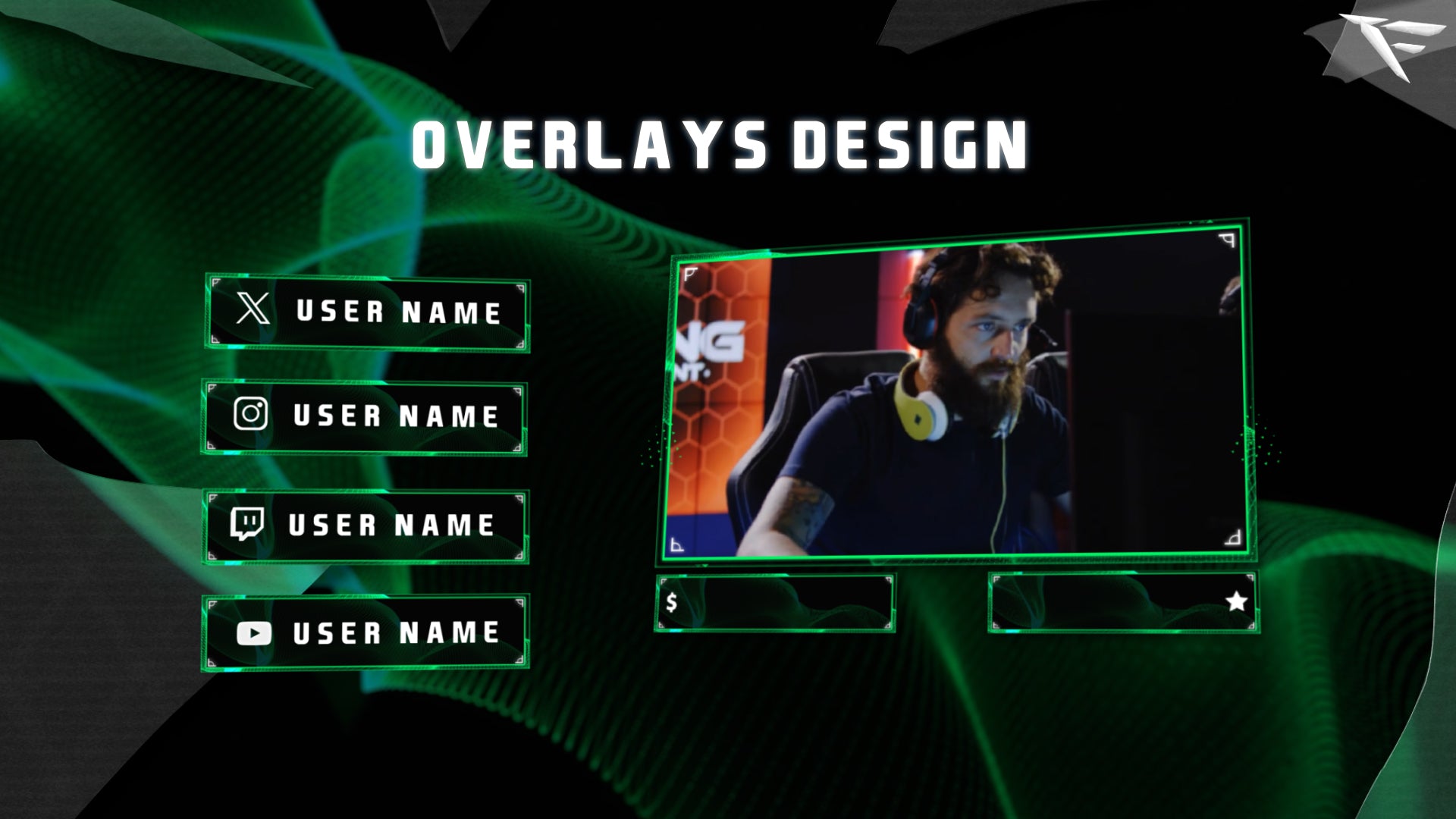
Take your camera presence to the next level with a sleek frame styled like a TV sports broadcast. Includes:
-
Space for name/socials
-
Clean scoreboard bar
-
Neon green glow accents
-
Works with all webcam sizes
-
Ideal for Twitch sports overlays or FIFA tournaments
📊 Stream Labels:
Get a pro HUD for your top supporters:
-
Latest Follower
-
Recent Subscriber
-
Top Donation
-
Sub Goal or Score Tracker
Each label is designed to mirror sports graphics — clean, bold, and easy to read.
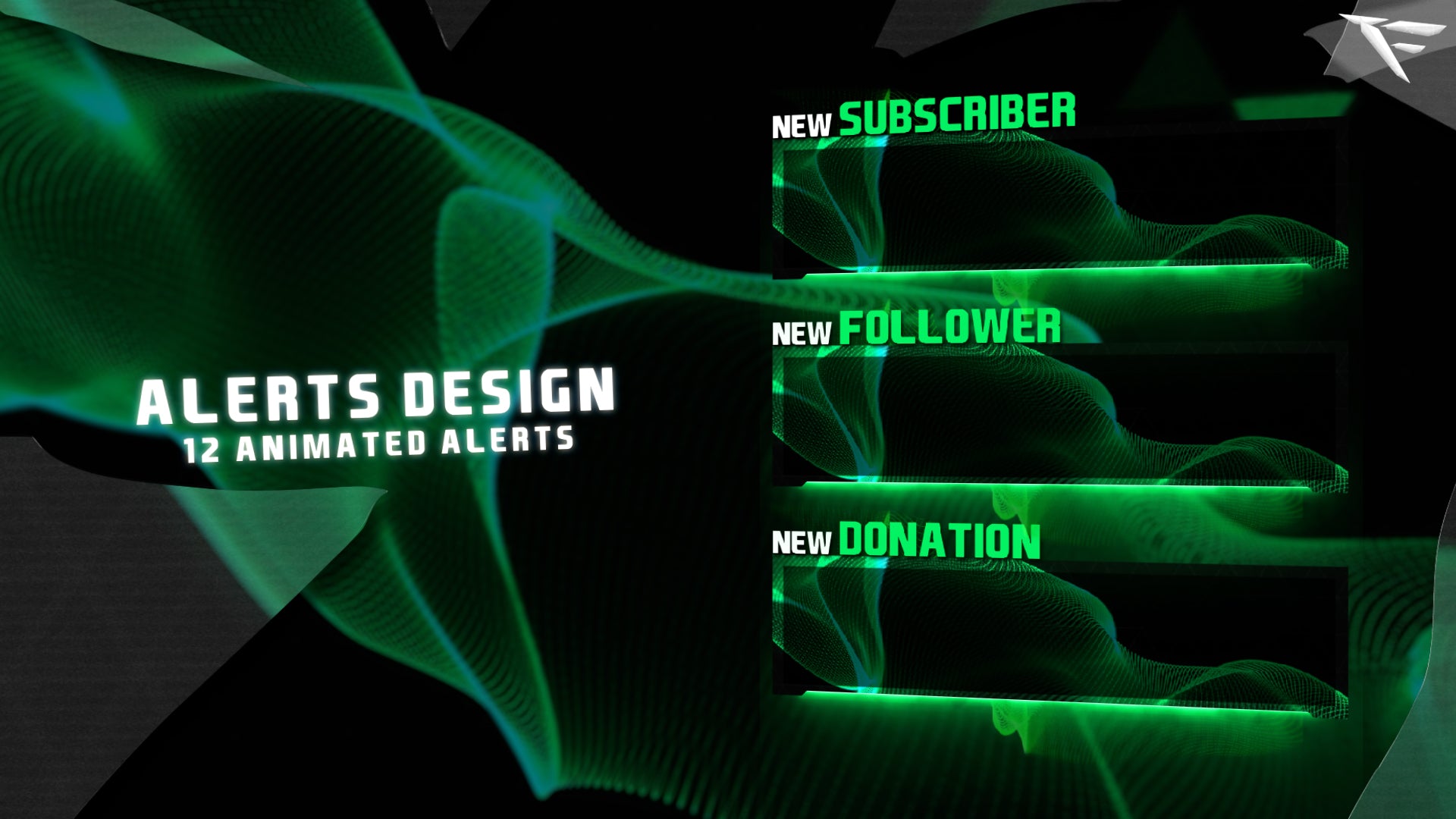
🔔 Animated Alerts:
Make every viewer action feel like a highlight reel moment:
-
Follow Alert – Player entry animation + spotlight burst
-
Subscriber Alert – Glowing overlay with celebration spark
-
Donation Alert – Scoreboard flip effect
-
Raid Alert – Loud arena-style transition
-
Bit/Cheer Alert – Confetti with color transitions
-
Fully transparent
.webmfiles -
Compatible with Streamlabs, OBS Studio, and StreamElements
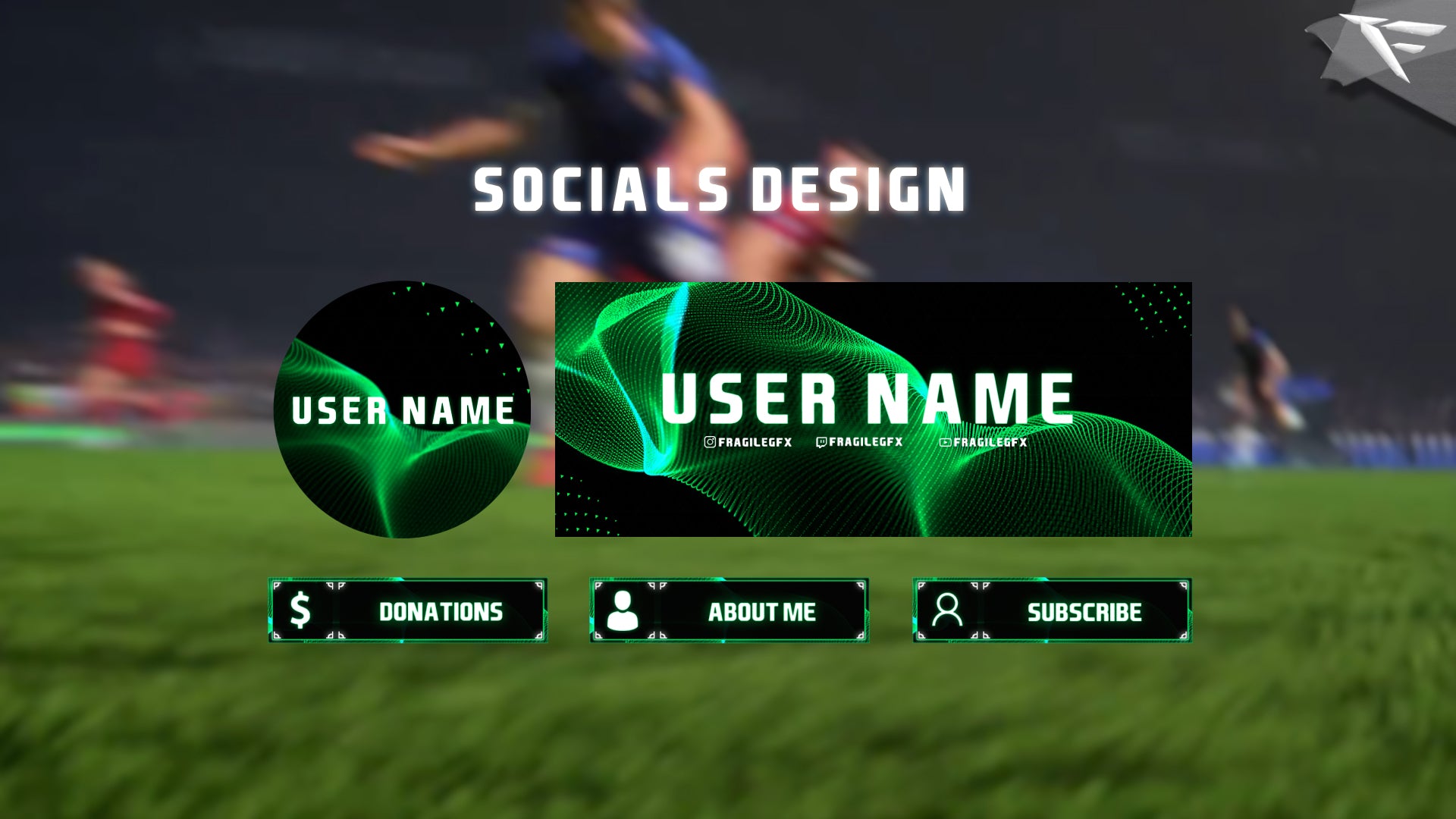
🧱 Twitch Panels (15+ Static):
Organize your Twitch profile with matching static panels, such as:
-
About
-
Donate
-
Rules
-
Schedule
-
Setup
-
Discord
-
Socials (YouTube, TikTok, Twitter, Instagram)
Clean typography, flat icons, and stadium-themed design help viewers navigate your content fast.
🎨 PSD included for full panel customization.
🌀 Stinger Transition:
Scene changes shouldn't be boring.
This animated transition brings a green motion burst that feels like shifting camera angles in a live match — fast, smooth, and full of energy.
🖼️ Branding Kit:
Build a pro presence beyond your stream:
-
Twitch Profile Banner – with editable PSD
-
Profile Picture Frame – clean and bold
-
Sized and optimized for Twitch, YouTube, Kick, or Facebook
⚙️ Installation & Support:
-
Quick import files for Streamlabs & OBS Studio
-
Organized folders: Scenes, Alerts, Panels, PSD
-
Step-by-step video tutorial included
-
Designed to run smoothly on low-spec PCs
4. Who Is This For?
🎮 Ideal For:
-
Twitch streamers playing FIFA, NBA 2K, UFC, Madden, WWE 2K, eFootball
-
Competitive creators and tournament hosts
-
Esports-themed channels
-
Streamers building a brand around sports, energy, and hype
Whether you’re a solo creator or part of an esports team, Superstars gives your stream structure and style.
5. Real-World Sports Feel
What separates this package from others?
It’s modeled after real televised sports production — from color palettes to layout logic:
-
Color: Dominant green for energy, black for contrast
-
Fonts: Bold headers and stat-style text
-
Motion: Smooth entrance and exit animations with subtle detail
-
Style: Tactical, modern, exciting
It’s made for:
-
Hype moments
-
Goal celebrations
-
Match countdowns
-
Victory screens
Every animation, sound cue, and overlay placement is designed to build excitement — and keep viewers engaged.
6. Performance First
We get it — performance matters.
All animations use .webm format with transparent backgrounds, meaning:
-
✅ Minimal CPU usage
-
✅ Seamless compatibility with all major platforms
-
✅ No lag, no buffering, no impact on stream quality
You get high quality visuals, without sacrificing frame rate.
7. Testimonials
🎩 “My stream went from basic to professional instantly. I’m getting way more engagement now.”
— BallControlTV
🏆 “I run a FIFA league and everyone’s using this pack. It makes the stream look like a real sports channel.”
— StrikerZone
🎥 “I used to just wing it — now I feel like a legit commentator.”
— CoachCrispy
8. Why Choose Superstars?
Because first impressions matter.
Because viewers compare your stream to what they see on TV.
Because good design keeps people watching.
With Superstars Sports Package, you’ll:
-
Look like a pro
-
Build a cohesive brand
-
Match your stream’s energy to your gameplay
-
Stand out in the Twitch sports and gaming category
No more default overlays. No more clutter. No more silence after alerts.
⚽ Become the MVP of Your Niche
Your content is great — now give it the presentation it deserves.
The Superstars Sports Package isn’t just a visual upgrade — it’s the branding power you’ve been missing.
🌟 Build hype.
🌟 Keep viewers engaged.
🌟 Look like a legend.
Ready to take your stream from casual to championship-level?
Grab the Superstars Sports Package and bring the arena to your audience — every time you go live.
What's Included
Package contents
What you get from buying this full pack.
Animated
Animated
Animated
2 Different versions
Static
Contact for changes
Animated
For all platforms
Animated
Animated
Animated
Animated
Animated
For Streamlabs & OBS Studio
Youtube Videos
Static
With PSD file to edit
Static
With PSD file to edit
All you need to know
Tutorials designed exclusively to simplify the setup of each and every component of our Stream Overlays
One-Click Installation
Our premade installation files make it a breeze to incorporate overlays and alerts into any stream you select.
Banner and Profile Pic
You can easily edit your Banner or profile pic through Photoshop, As shown it's a simple as changing a text, If you don't have Photoshop then just contact us through live chat or Discord and we will do it for you.
Support
You can contact us via Discord for more effectively support and to get your revisions done in a minute.
You also might like




FAQ
Possible inquiries about our services and Stream Overlays
How do I install this Twitch overlay in OBS?
To install this Twitch overlay in OBS
- Download the overlay files from your order confirmation email.
- Open OBS Studio.
- Click the '+' icon under Sources and select 'Browser'.
- Name your source and click OK.
- Check 'Local file' and browse to the downloaded overlay HTML file.
- Set Width to 1920 and Height to 1080.
- Click OK to add the overlay to your scene.
Is this Twitch overlay compatible with Streamlabs Desktop?
Yes! All FragileGFX overlays are compatible with both OBS Studio and Streamlabs Desktop. The installation process is similar - simply add the overlay files as a browser source in either streaming software.
Can I customize the colors of this overlay?
Yes, our overlays are fully customizable. Each overlay package includes documentation on how to change colors, text, and other elements.
What resolution is this Twitch overlay?
All FragileGFX overlays are designed in 1920x1080 (Full HD) resolution, which is the standard streaming resolution for Twitch and YouTube. They will automatically scale to fit your stream settings.
Do I need any special software to use this overlay?
ou only need streaming software like OBS Studio (free) or Streamlabs OBS (free) to use our overlays. No additional software or subscriptions are required. The overlays work right out of the box.
Can I use this overlay for commercial streaming?
Yes! Once you purchase a FragileGFX overlay, you have a commercial license to use it on your Twitch, YouTube, or Facebook Gaming streams. You can monetize your streams without any additional fees.
What's included in this Twitch overlay package?
Each overlay package typically includes: webcam frame, alert overlays (follow, subscribe, donation), transition screens, starting soon screen, be right back screen, ending screen, and all necessary graphics files. Specific items vary by package - check the product description for full details.
Will this work with StreamElements or other alert systems?
Yes, our overlays are compatible with all major alert systems including StreamElements, Streamlabs Alerts, and StreamLabs. The overlays are designed to work alongside these services seamlessly.