


Spooky Arcade
Spooky Arcade Stream Overlay Package
Retro Thrills. Haunted Vibes. Stream Like It’s Halloween—All Year Long.
Step into a world where neon nostalgia collides with eerie aesthetics. The Spooky Arcade Stream Package is your ultimate visual toolkit for creating a streaming atmosphere that’s both spine-chilling and electrifying. It’s designed for streamers who want to blend retro arcade energy with haunted Halloween vibes—and look absolutely unforgettable while doing it.
👻 What Makes It Special
This isn’t your average Halloween overlay. Spooky Arcade fuses two fan-favorite aesthetics—80s arcade visuals and spooky supernatural elements—into one cinematic, animated experience. Whether you're streaming horror games, hosting late-night chill sessions, or building up to a Halloween event, this package wraps your content in a dark, glowing mystery that grabs attention from the first frame.
🕹️ Perfect For:
-
Twitch & YouTube streamers who love horror, retro, or both
-
October-themed marathons and Halloween specials
-
VTubers and content creators building a unique streaming persona
-
Indie game streamers diving into pixel horror or glitchy thrillers
-
Anyone ready to level up their vibe and stand out in a crowded stream feed
💀 Core Features
-
Fully animated overlay files with glitchy, retro effects
-
Custom-designed Halloween-inspired graphics
-
Aesthetic balance between playful arcade and haunted horror
-
Smooth transitions, stingers, and scene layouts
-
Built for OBS, Streamlabs, and all modern streaming platforms
-
Flexible design: works for facecam, gameplay, or full-screen content
⚙️ What’s Inside?
-
Animated overlays (.webm format)
-
Stream screens: Starting Soon, BRB, Intermission, and more
-
Transition animations (stingers)
-
Modular HUD elements and alerts
-
Easy-to-use setup instructions
-
Optional source files for advanced customization
🎮 Games It Works Great With:
-
Phasmophobia, Five Nights at Freddy’s, Dead by Daylight
-
Retro-style pixel horror games
-
Resident Evil, Silent Hill, or any survival horror title
-
Halloween event streams and spooky community nights
🔮 Why Streamers Love It
Because Spooky Arcade isn’t just a design—it’s a whole mood. It gives your stream instant identity, complete with a mysterious glow, glitchy overlays, and subtle horror aesthetics that make your content feel like a haunted arcade cabinet come to life.
It keeps viewers immersed, engaged, and coming back for more—especially during spooky season (or anytime you feel like being a little creepy and cool).
🧠 No Tech Stress, Just Plug & Play
All assets are optimized for quick setup. Whether you're a beginner or a seasoned creator, you'll be able to install, customize, and launch your spooky scenes in minutes. And if you need help, our team is always just a message away.
🛸 You’re Not Just Streaming. You’re Broadcasting From the Afterlife.
If you're ready to break free from bland overlays and boring templates, the Spooky Arcade Stream Package is your next upgrade. It’s cinematic, reactive, and radiates personality.
🎃 Ready to haunt your stream in style?
Download the Spooky Arcade Package now and take your viewers on a ghost ride through neon nightmares and nostalgic chills.
What's Included
Package contents
What you get from buying this full pack.
Animated
Animated
Animated
2 Different versions
Static
Contact for changes
Animated
For all platforms
Animated
Animated
Animated
Animated
Animated
For Streamlabs & OBS Studio
Youtube Videos
Static
With PSD file to edit
Static
With PSD file to edit
All you need to know
Tutorials designed exclusively to simplify the setup of each and every component of our Stream Overlays
One-Click Installation
Our premade installation files make it a breeze to incorporate overlays and alerts into any stream you select.
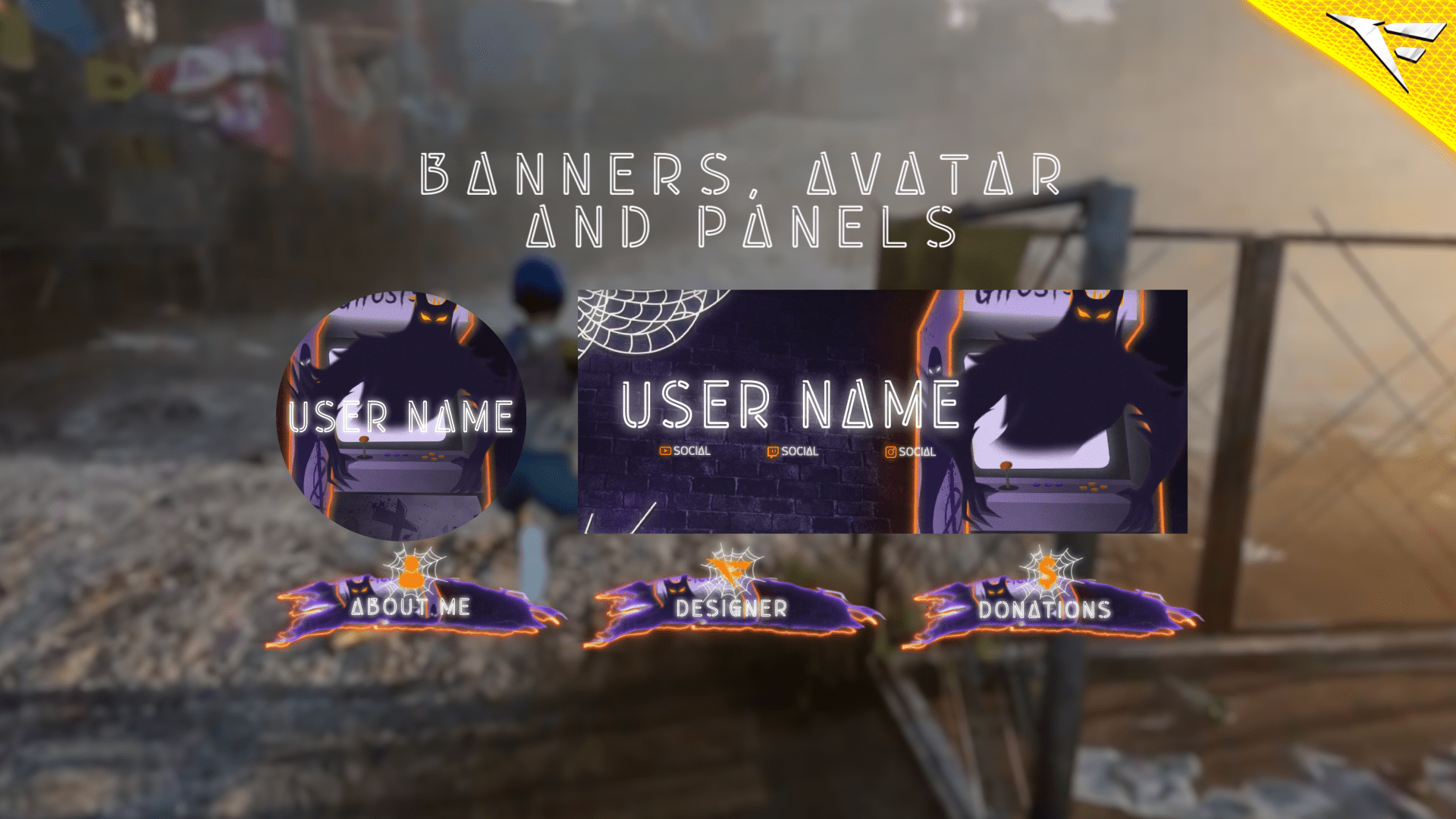
Banner and Profile Pic
You can easily edit your Banner or profile pic through Photoshop, As shown it's a simple as changing a text, If you don't have Photoshop then just contact us through live chat or Discord and we will do it for you.
Support
You can contact us via Discord for more effectively support and to get your revisions done in a minute.
You also might like




FAQ
Possible inquiries about our services and Stream Overlays
How do I install this Twitch overlay in OBS?
To install this Twitch overlay in OBS
- Download the overlay files from your order confirmation email.
- Open OBS Studio.
- Click the '+' icon under Sources and select 'Browser'.
- Name your source and click OK.
- Check 'Local file' and browse to the downloaded overlay HTML file.
- Set Width to 1920 and Height to 1080.
- Click OK to add the overlay to your scene.
Is this Twitch overlay compatible with Streamlabs Desktop?
Yes! All FragileGFX overlays are compatible with both OBS Studio and Streamlabs Desktop. The installation process is similar - simply add the overlay files as a browser source in either streaming software.
Can I customize the colors of this overlay?
Yes, our overlays are fully customizable. Each overlay package includes documentation on how to change colors, text, and other elements.
What resolution is this Twitch overlay?
All FragileGFX overlays are designed in 1920x1080 (Full HD) resolution, which is the standard streaming resolution for Twitch and YouTube. They will automatically scale to fit your stream settings.
Do I need any special software to use this overlay?
ou only need streaming software like OBS Studio (free) or Streamlabs OBS (free) to use our overlays. No additional software or subscriptions are required. The overlays work right out of the box.
Can I use this overlay for commercial streaming?
Yes! Once you purchase a FragileGFX overlay, you have a commercial license to use it on your Twitch, YouTube, or Facebook Gaming streams. You can monetize your streams without any additional fees.
What's included in this Twitch overlay package?
Each overlay package typically includes: webcam frame, alert overlays (follow, subscribe, donation), transition screens, starting soon screen, be right back screen, ending screen, and all necessary graphics files. Specific items vary by package - check the product description for full details.
Will this work with StreamElements or other alert systems?
Yes, our overlays are compatible with all major alert systems including StreamElements, Streamlabs Alerts, and StreamLabs. The overlays are designed to work alongside these services seamlessly.