

Sci-Fi Samurai
Step into the future of streaming with the Sci-Fi Samurai Package – a breathtaking fusion of cybernetic design and ancient warrior spirit. Designed for streamers who crave a unique and powerful aesthetic, this stream overlay package draws inspiration from neon-lit cities and the honor-bound path of the samurai, delivering a cinematic experience every time you go live.
Whether you're playing futuristic shooters, RPGs, or action-packed story games, the Sci-Fi Samurai stream overlay package wraps your content in a dynamic, immersive visual identity that instantly grabs attention.
⚔️ What's Special About This Package?
1. Futuristic Aesthetic Meets Traditional Power
The design combines high-tech holographic elements with katana-sharp lines and glowing accents, inspired by both anime cyberpunk and traditional Japanese motifs. This makes it perfect for channels looking to stand out with a strong brand identity.
2. Fully Animated Overlays
Each overlay comes to life with smooth animations, from the animated webcam frames to dynamic alerts. These animations pulse with energy, featuring digital glitches, neon glow effects, and motion graphics that enhance viewer engagement.
3. Easy Integration
Optimized for Twitch, YouTube, Facebook Gaming, and Kick, the overlays are plug-and-play ready with Streamlabs, OBS, and StreamElements. No extra setup or advanced skills required.
🧩 What’s Included?
-
Animated & Static Overlays
→ Starting Soon, BRB, Intermission, and Stream Ending Screens – fully animated with seamless motion.
→ Static versions for low-resource streaming. -
Webcam Frame (Animated + Static)
→ Stylish frame with animated accents that sync with the overlay’s theme. -
Alerts (Optional)
→ Add animated alert variations for subs, followers, donations, raids, and more. -
Panels & Labels
→ Custom Twitch panels and stream labels that match the sci-fi samurai theme. -
Chat Box & Stream Backgrounds
→ Futuristic chat box skin and thematic backgrounds. -
Customizable PSDs
→ Edit names, colors, or labels with included source files (if your plan allows customization).
💡 Why Choose the Sci-Fi Samurai Package?
-
Stand out from generic overlays with a powerful identity.
-
Reflect your personality and favorite game genres like Cyberpunk 2077, Ghostrunner, or futuristic RPGs.
-
Designed for streamers who treat their stream like a brand or art piece.
📦 Who Is It For?
This package is ideal for:
-
Gamers who stream cyberpunk, sci-fi, or anime-related content.
-
Creators with a passion for Japanese culture and aesthetic.
-
Streamers seeking premium-quality overlays with cinematic vibes.
⚙️ Compatibility
-
OBS Studio
-
Streamlabs OBS
-
StreamElements
-
Twitch Studio
-
YouTube Live / Kick / Facebook Gaming
🚀 Elevate Your Stream Experience
The Sci-Fi Samurai Package isn’t just an overlay – it’s a transformation. Give your audience a futuristic, unforgettable experience that mirrors your energy, creativity, and vision as a streamer.
Your path is lit with neon, your voice echoes through virtual temples, and your community follows the way of the blade.
What's Included
Package contents
What you get from buying this full pack.
Animated
Animated
Animated
2 Different versions
Static
Contact for changes
Animated
For all platforms
Animated
Animated
Animated
Animated
Animated
For Streamlabs & OBS Studio
Youtube Videos
Static
With PSD file to edit
Static
With PSD file to edit
All you need to know
Tutorials designed exclusively to simplify the setup of each and every component of our Stream Overlays
One-Click Installation
Our premade installation files make it a breeze to incorporate overlays and alerts into any stream you select.
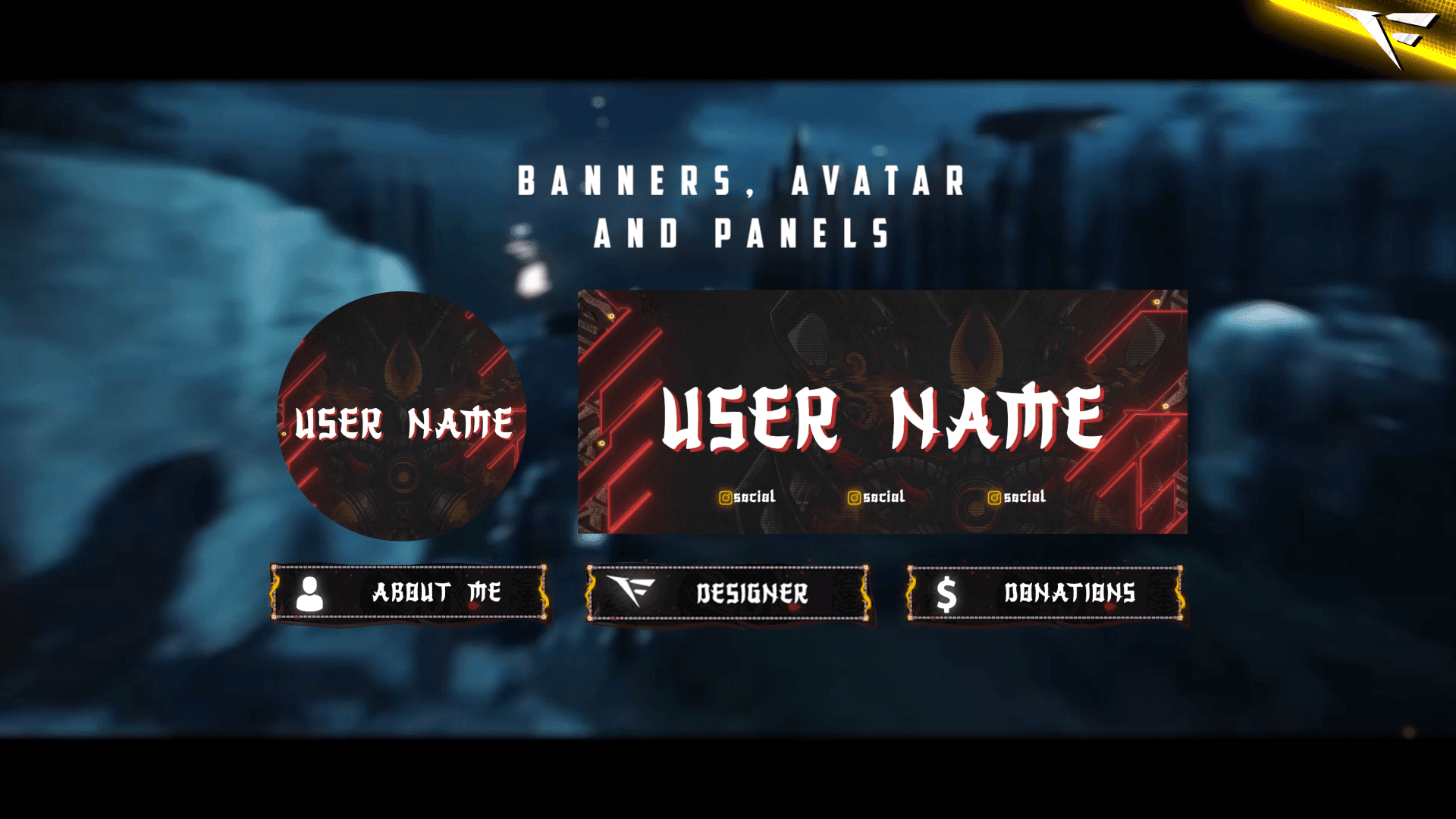
Banner and Profile Pic
You can easily edit your Banner or profile pic through Photoshop, As shown it's a simple as changing a text, If you don't have Photoshop then just contact us through live chat or Discord and we will do it for you.
Support
You can contact us via Discord for more effectively support and to get your revisions done in a minute.
You also might like




FAQ
Possible inquiries about our services and Stream Overlays
How do I install this Twitch overlay in OBS?
To install this Twitch overlay in OBS
- Download the overlay files from your order confirmation email.
- Open OBS Studio.
- Click the '+' icon under Sources and select 'Browser'.
- Name your source and click OK.
- Check 'Local file' and browse to the downloaded overlay HTML file.
- Set Width to 1920 and Height to 1080.
- Click OK to add the overlay to your scene.
Is this Twitch overlay compatible with Streamlabs Desktop?
Yes! All FragileGFX overlays are compatible with both OBS Studio and Streamlabs Desktop. The installation process is similar - simply add the overlay files as a browser source in either streaming software.
Can I customize the colors of this overlay?
Yes, our overlays are fully customizable. Each overlay package includes documentation on how to change colors, text, and other elements.
What resolution is this Twitch overlay?
All FragileGFX overlays are designed in 1920x1080 (Full HD) resolution, which is the standard streaming resolution for Twitch and YouTube. They will automatically scale to fit your stream settings.
Do I need any special software to use this overlay?
ou only need streaming software like OBS Studio (free) or Streamlabs OBS (free) to use our overlays. No additional software or subscriptions are required. The overlays work right out of the box.
Can I use this overlay for commercial streaming?
Yes! Once you purchase a FragileGFX overlay, you have a commercial license to use it on your Twitch, YouTube, or Facebook Gaming streams. You can monetize your streams without any additional fees.
What's included in this Twitch overlay package?
Each overlay package typically includes: webcam frame, alert overlays (follow, subscribe, donation), transition screens, starting soon screen, be right back screen, ending screen, and all necessary graphics files. Specific items vary by package - check the product description for full details.
Will this work with StreamElements or other alert systems?
Yes, our overlays are compatible with all major alert systems including StreamElements, Streamlabs Alerts, and StreamLabs. The overlays are designed to work alongside these services seamlessly.